
How to Set Up Drogon TV on Windows / Mac
7 steps with screenshots. You'll need your username, password and server URL — these are issued after checkout and always available in your account dashboard.
IPTV Smarters Pro
- 1
Desktop via IPTV Smarters
Download IPTV Smarters Pro
Download the official IPTV Smarters Pro desktop app for your operating system.
Tip: If your browser flags the download, choose “See more” → “Keep” (and “Keep anyway” if asked) to save the file.
- 2
Desktop via IPTV Smarters
Install the app
On Windows, double-click the .exe and follow the setup wizard. On Mac, open the .dmg and drag the app to your Applications folder.
Tip: Windows SmartScreen may warn about the installer. Click “More info”, then “Run anyway” to proceed.
- 3
Desktop via IPTV Smarters
Mac only: allow the app to open
If macOS blocks the app because it's from an unidentified developer, open System Settings → Privacy & Security, scroll to the bottom, and click Open Anyway next to the blocked-app message. Then relaunch the app from Applications and click Open.
Tip: This is only needed once. Windows users can skip this step.
- 4
Desktop via IPTV Smarters
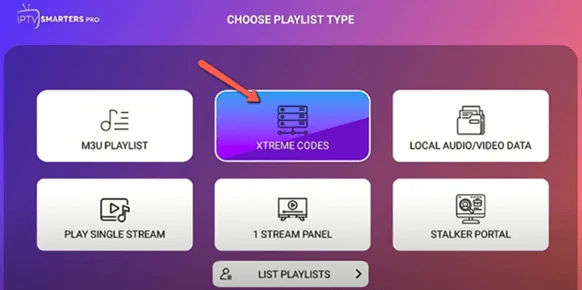
Choose the login method
Open IPTV Smarters Pro and choose Login with Xtream Codes API.
Tip: If you only have an M3U link (not credentials), choose the Add M3U URL option instead.
- 5
Desktop via IPTV Smarters
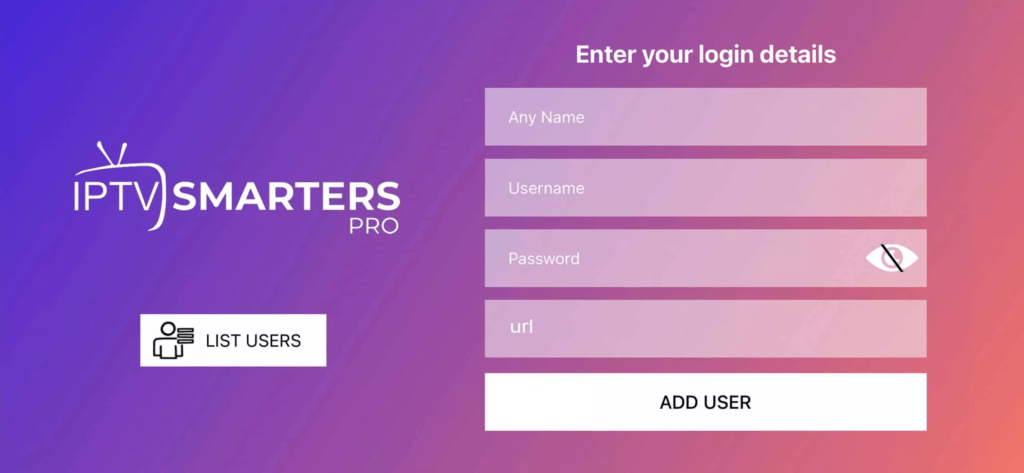
Enter your credentials
Enter a nickname for this account, then fill in your details. You'll find your username, password and server URL on your order page in this portal (Subscriptions → your order). They were also sent to you after purchase.
- 6
Desktop via IPTV Smarters
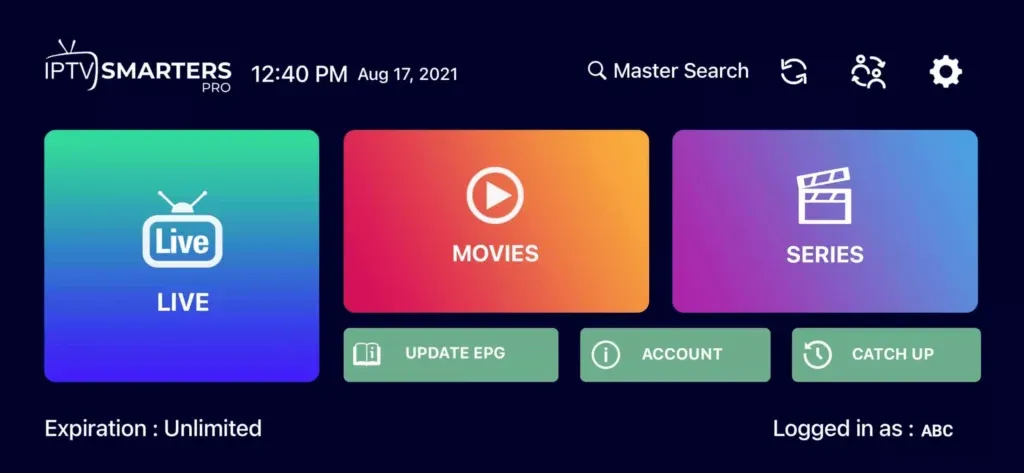
Explore & watch
Your full library loads: Live TV, Movies and Series. Use the sidebar to browse and search.
- 7
Enjoy watching
IPTV Smarters Pro is ready on your computer — enjoy your subscription!
Stuck?
If the app installs but playback stutters, that's usually connection- or device-related rather than a problem with the channel — work through ourbuffering fixes guide. For anything else, contact support.
Setting up a different device? See all setup guides.