
How to Set Up Drogon TV on Formuler Box
5 steps with screenshots. You'll need your username, password and server URL — these are issued after checkout and always available in your account dashboard.
MyTVOnline
- 1
Formuler setup
Initial device setup
After turning on your Formuler box for the first time, complete the basic setup: region, language, date format and the other options shown on screen.
- 2
MyTVOnline
Open My TV Online
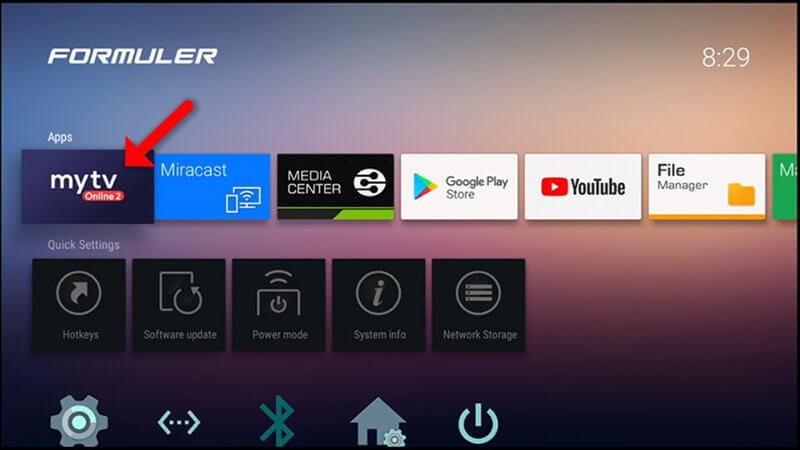
From the Formuler home screen, open the My TV Online app.
- 3
MyTVOnline
Click Edit
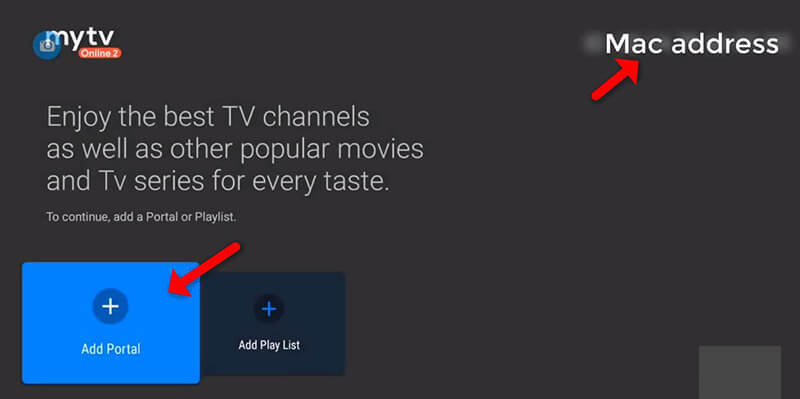
You'll see the portal configuration screen. Click Edit to open the input fields.
- 4
MyTVOnline
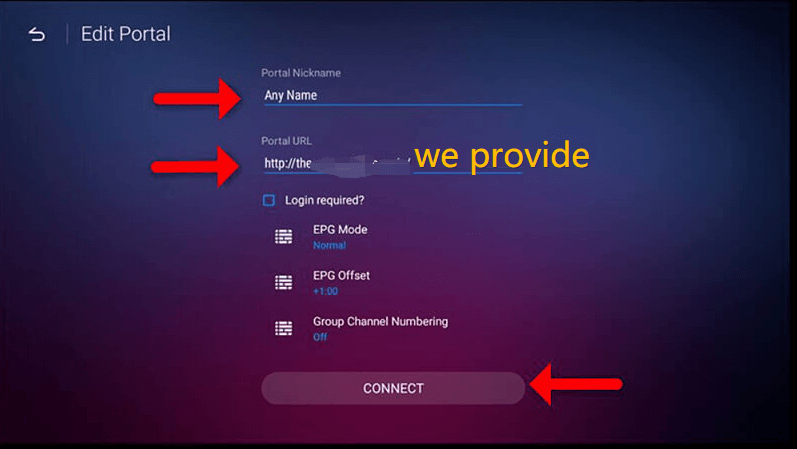
Enter your portal details
Portal Nickname: any name you like
Portal URL: the MAG Portal URL we provided
Do I need to log in? NO
User ID / Password: leave blankTip: The Portal URL typically looks like http://server:port/c/. On newer boxes you can also use MyTVOnline 2's Add Portal or Add M3U Playlist options with the same details.
- 5
Click OK & watch
Your Formuler is connected to the portal and your channel list is loading — enjoy!
Stuck?
If the app installs but playback stutters, that's usually connection- or device-related rather than a problem with the channel — work through ourbuffering fixes guide. For anything else, contact support.
Setting up a different device? See all setup guides.